
# Popular Tools
# Blog Posts
No Posts Found!
Facebook Cover Photo Resizer
Drag and drop your image here or click to browse
# Related Tools








One-Click Facebook Cover Photo Resizer – No Skills Needed
A good Facebook profile or page starts with having the right cover photo. When a visitor’s land on your profile or page they notice your cover photo first. If your cover photo dimensions don’t fit properly, the image can look blurry, stretched out and cut off. That why make cover photo to the proper Facebook cover photo dimensions.
The best size for a Facebook cover photo is 851 × 315 pixels. This size makes the image displays on desktop and mobile devices. But resizing photos yourself can often feel tricky and confusing.
This tool called the Facebook Cover Photo Resizer; helps you fine-tune your cover images to fit . You can resize Facebook cover photos to the right size in no time and still keep their quality intact. It works well whether you’re just starting out managing a brand, or running social media accounts. The process is simple and quick.
What is this Facebook Cover Photo Resizer?
Facebook Cover Photo Resizer is a free online tool that changes any size of an image to match the proper Facebook cover photo dimensions.
You won’t need any complex design software to resize an image. The tool makes your image to the standard Facebook cover dimensions of 851 × 315 pixels. In this tool you need to just upload your photo and make small adjustments if you want, and save your resized image.
The main goal of this tool is to let users resize images to fit Facebook cover photo dimensions while keeping them sharp and clear.
With it, you can make a sized cover photo for Facebook in just a few seconds.
Why Use This Tool?
A lot of people upload images to Facebook without checking their exact size. This leads to several issues.
Problems Caused by the Wrong Cover Photo Size
- Facebook might crop the image on its own
- Key parts of your photo may not show up
- Your photo could look blurry or warped
- It might appear on phones compared to computers
- Large images take longer to load
How This Tool Fixes These Issues?
The Facebook Cover Photo Resizer fixes these problems by resizing your image to the exact Facebook cover photo size 851×315.
You don’t have to edit the image by hand. The tool adjusts the size of your photo keeping it clear and high quality. This makes sure that your Facebook cover photo fits just right, every single time.
Key Features of the Facebook Cover Photo Resizer
This tool is created to be easy to use super quick, and effective. Check out its core features:
- Instant Image Resizing adjust any image to fit Facebook cover standards.
- Facebook Cover Photo Dimensions set your design size to 851 × 315 pixels.
- File Size Reduction Shrink the file size without losing the quality of the image.
- Simple Drag and Drop your image in the upload area.
- Clear Output the tool keeps images sharp and clear every time.
- Free and User-Friendly No sign-up or software downloads are needed to use it.
- Supports Many Formats Works with popular formats like JPG, PNG, and others.
These features make the Facebook Cover Photo Resizer a great choice for resizing images with ease and speed.
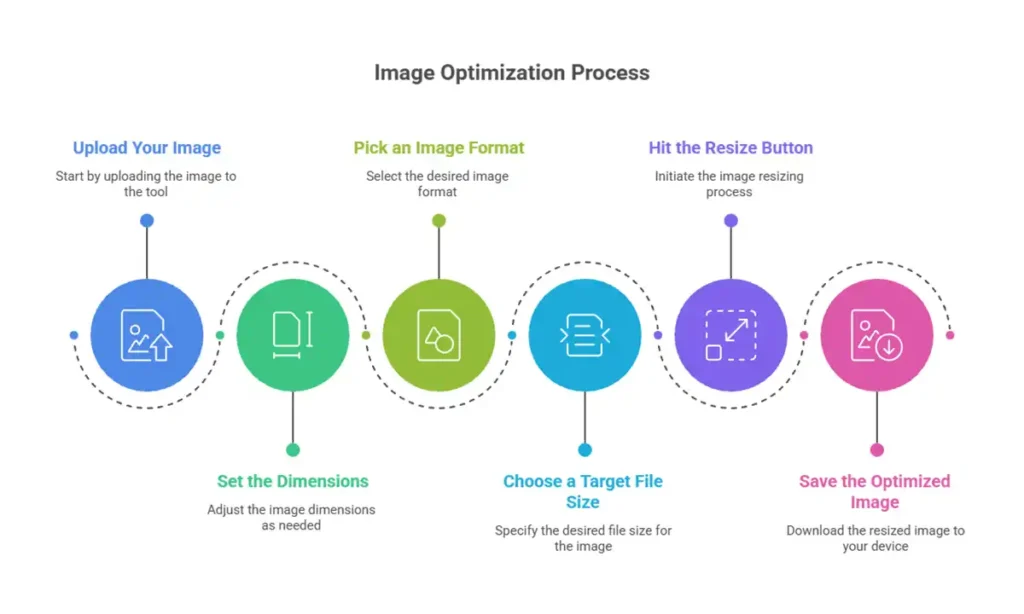
Step-by-Step Guide: How to Use the Tool
The Facebook Cover Photo Resizer makes resizing images easy. You need to complete a few basic steps.
> Upload Your Image
Hit the Select Cover Image button, drag your file into the upload box to get started.
> Set the Dimensions
The tool applies the correct size for a Facebook cover photo (851 × 315 pixels).
You can change the dimensions if you want, but the default size fits Facebook.
> Pick an Image Format
Decide on the final format for your image, like JPG or PNG.
If you’re working with photos, JPG is a good option since it helps keep file sizes low.
> Choose a Target File Size
You can pick a file size to compress your image if needed. It keeps the quality good while reducing the size.
This helps Facebook load your cover photo more.
> Hit the Resize Button
Press the Resize for Cover option. The tool will adjust the size of your image to fit.
> Save the Optimized Image
After resizing, click Download to get your Facebook cover photo.
Your resized image is ready to be uploaded to Facebook now.
Why Use the Facebook Cover Photo Resizer?
This tool offers plenty of perks for people using it or for their businesses.
Saves Time
You don’t need to spend a lot of time with complex image-editing programs. This tool resizes your photos in moments.
Keeps Your Images Clear
The tool keeps your photos sharp and clear even after you resize them.
Fits Facebook Perfectly
Your photo will fit the exact Facebook cover photo size making it look great on any phone, tablet, or computer.
Compatible with All Devices
The Facebook Cover Photo Resizer works perfectly whether you’re using a computer or a mobile device.
You can resize your photos anywhere anytime.
No Skills Needed
You don’t need to be a designer to resize your Facebook cover photos.
Simple Ideas to Create the Best Facebook Cover Photo
A good cover photo can make your profile or page stand out. Read these simple tips.
Choose the Right Dimensions
Always make your cover image with the Facebook cover photo size of 851×315 pixels to prevent it from being cropped.
Focus on the Center for Important Details
Keep text, logos, or key visuals in the middle. This ensures everything looks right on any device.
Use Clear and Crisp Images
Blurry images result from low resolution. Begin with a sharp and high-quality image before resizing it.
Stick to a Simple Design
Don’t clutter your cover photo with too much detail. Clean and straightforward designs tend to look better.
Frequently Asked Questions (FAQ)
851 × 315 pixels is the best size for a Facebook cover photo. This makes sure that the picture looks good on both mobile and desktop screens.
If you want to change the size of your photo, try an online Facebook Cover Photo Resizer. You just upload the picture, pick the right size, resize it, and then download the new one.
Not if you choose a good resizer. A good Facebook Cover Photo Resizer changes the size of the picture without making it blurry or fuzzy.
Yes. You don't have to sign up or make an account to use this tool to change the size of Facebook cover photos for free.
Yes. You can use the Facebook Cover Photo Resizer on your phone, tablet, or computer.
Why is it important?
Choosing the right size for your Facebook cover photo makes your profile or business page look neat and professional. The right size for Facebook cover photos is 851 × 315 pixels. This keeps your image clear and fits.
You can use the Facebook Cover Photo Resizer instead of editing software that is hard to use. It helps you change your picture and.
Just upload your picture, change it to fit the size of the Facebook cover, and you’ll have a version that’s ready to use in seconds.
Use the Facebook Cover Photo Resizer to make a great Facebook cover photo in no time.
No more endless tabs or tool hunting.
KiiTool is a free all-in-one toolbox designed to simplify your daily tasks—fast, clean, and bookmark-free.
Contact
Info@kiitool.com
1463 Chandler Drive Springfield, MO 65806
© 2025 Developed by KiiTool