
# Popular Tools
# Blog Posts
No Posts Found!
Facebook Group Cover Resizer
Drag and drop your image here or click to browse
# Related Tools







Facebook Group Cover Photo Resizer – Easy & Free Online Tool
The first thing people see when they visit your group is a Facebook group cover. It makes a good first impression, and it helps to illustrate what your group is all about. But if you get your image size wrong, Facebook might crop or stretch it and make your design look bad.
So, it is important to use the right size, which is 1640 x 856 pixels. You can make this process easy by using a Facebook Group Cover Photo Resizer. This tool will allow you to resize your images without any trouble.
What is Facebook Group Cover Photo Resizer?
A Facebook Group Cover Photo Resizer is an online tool that helps you resize your image to the exact Facebook group cover size (1640×856 px).
No design skills required. No software required. Upload your image and resize and download it in seconds. It’s a free Facebook cover resizer and works in your browser.
This tool helps you create a new group or update your cover quickly and easily.
Key Features of the Tool
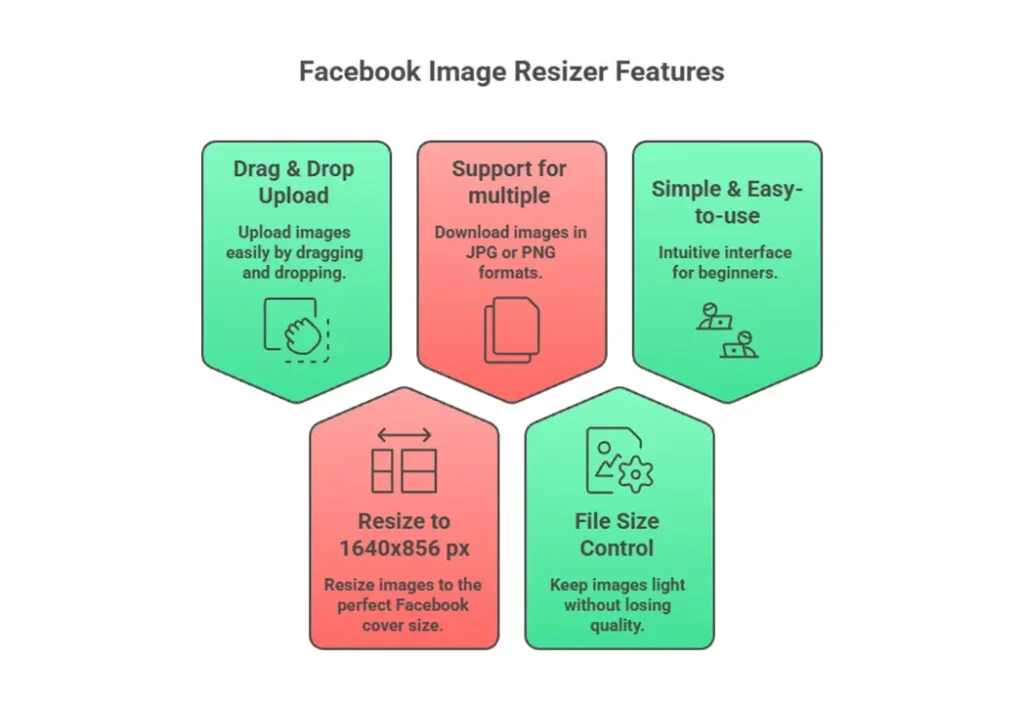
Helpful features of this Facebook image resizer online include:
- Drag & Drop Upload: Simply drag your image or upload it with one click.
- Resize to 1640×856 px: Resize your picture to the ideal Facebook cover size.
- Support for multiple: Download your image in JPG or PNG formats.
- File Size Control: Keep your image light with no loss in quality.
- Simple & Easy-to-use: Interface Intuitive layout for easy understanding by beginners.
How to Use This Tool (Step-by-Step)
This tool is incredibly easy to use. Simply follow these steps.
- Upload Your Image: Select or drag your image into the tool.
- Set Dimensions: The tool will set the size to 1640×856 pixels.
- Click Resize: To process your image, click the “resize” button.
- Download Image: Save the resized Facebook group cover.
That is it! Your image is now available for usage.
Why You Need This Tool?
Uploading the wrong image size may cause Facebook to crop important parts of your design. This may look unprofessional on your cover.
Here’s why you should use a Facebook group cover resizer tool:
- Avoid Image Cropping: Keep the entire design exposed without cutting.
- Maintain Quality: Your image remains sharp and clear.
- Save Time: There is no need for manual size adjustments.
- No Design Skills Required: Anyone can use this tool.
Benefits
Using an online resize cover photo online tool comes with many benefits:
- ✅ Free to Use: Our tool is no cost, no hidden charges; it’s 100% free.
- 🌐 Works Online: No need to install any software.
- 📱 Mobile & Desktop Friendly: Use it on any mobile and desktop device anytime.
- ⚡ Quick Results: You can resize any images in just a few seconds.
Frequently Asked Questions (FAQ)
The recommended size is 1640x856 pixels for all devices.
Yes, this is a free Facebook cover resizer with no cost.
Yes, the tool maintains your image quality while resizing.
JPG and PNG are the most common formats. JPG is best for smaller file sizes.
Yes, the tool works on both mobile and desktop devices.
Conclusion
Designing the perfect Facebook group cover should not be difficult. The right tool will allow you to resize your images without losing quality.
Looking for a quick and simple solution? Try our Facebook group cover photo resizer today.
👉 Create perfect cover images instantly with our Facebook Group Cover Photo Resizer now at kiitool.com
No more endless tabs or tool hunting.
KiiTool is a free all-in-one toolbox designed to simplify your daily tasks—fast, clean, and bookmark-free.
Contact
Info@kiitool.com
1463 Chandler Drive Springfield, MO 65806
© 2025 Developed by KiiTool