
# Popular Tools
# Blog Posts
No Posts Found!
Text Repeater
Efficiently duplicate and format text strings
Input String
Output
Characters
0
Words
0
Lines
0
# Related Tools

Text to Slug


Add Line Number

Remove Line Breaks

Word Counter

Text Repeater

Remove Duplicate

Whitespace Remover

Sort Text
Text Repeater for WhatsApp – Free Online Tool
Looking for an easy text repeater for WhatsApp? The free tool on kiitool.com helps you repeat any text or message instantly. You can create repeated WhatsApp messages, duplicate words, or long text lines in just one click.
This tool is useful for fun chats, message formatting, testing long texts, creating stylish repeated messages, and quick copy-paste tasks. Whether you want to repeat “Hello” 100 times or generate fancy repeated text for WhatsApp, this online text repeater makes everything simple.
The best thing is that the tool operates online, is fully free, and does not require any signups or installations.
What is a Text Repeater for WhatsApp?
A WhatsApp text repeater is an internet program that automatically repeats the same phrase, sentence, or message.
Instead of inputting the same text over and over, users can write a single message and specify how many times it should be repeated. The program generates repeating text that can be copied and pasted immediately.
For example:
Input:
Hello
Repeat Count:
5
Output:
Hello Hello Hello Hello Hello
The text repeater for WhatsApp tool on kiitool.com also gives extra formatting options like separators, uppercase text, prefixes, suffixes, and more.
Features of the Text Repeater Tool
01. Input String
The Input String box is where users type or paste their text.
Example:
“Hello World!”
You can enter:
1. Single words
2. Sentences
3. Emojis
4. Symbols
5. Long messages
This makes the tool perfect for creating repeated WhatsApp messages quickly.
02. Repeat Count
The Repeat Count option lets users specify how many times the text should repeat.
For example:
1. 5 times
2. 20 times
3. 100 times
4. Unlimited repeating
This feature is useful for users who want a fast repeat message generator without manual typing.
03. Separator Options
The Separator feature helps organize repeated text neatly.
Available separator styles include:
1. Space
2. Comma
3. New line
4. Custom separator
Example with Space
Hello Hello Hello
Example with Comma
Hello, Hello, Hello
Example with New Line
Hello
Hello
Hello
Users can also create their own separator for custom formatting. This makes the tool a useful text repeat copy paste solution.
04. Letter Case Options
The tool includes multiple letter case styles to change text formatting automatically.
Original
Keeps the text unchanged.
Uppercase
Changes text to uppercase letters.
Example:
HELLO WORLD
Lowercase
Changes everything into small letters.
Example:
hello world
Capitalized
Makes the first letter uppercase.
Example:
Hello World
This feature is very useful for creating stylish or fancy WhatsApp messages.
05. Prefix Feature
The Prefix option adds text before every repeated message.
Example:
Prefix: 👉
Output:
👉 Hello
👉 Hello
👉 Hello
Users can add:
1. Emojis
2. Symbols
3. Numbers
4. Custom text
This is useful for formatting lists or creating eye-catching repeated messages.
06. Suffix Feature
The Suffix option adds text after every repeated message.
Example:
Hello 😊
This feature helps users create fun and stylish repeated text for WhatsApp chats and social media posts.
07. Process Text Button
After entering all settings, users simply click the Process Text button.
The tool instantly generates the repeated output within seconds.
No loading, no complex setup, and no registration required.
08. Output Section
The Output Section displays the final repeated text.
Users can:
1. Review the generated text
2. Edit it if needed
3. Copy it easily
The output updates quickly based on selected settings.
09. Copy Button
The Copy button helps users copy all repeated text with one click.
This saves time and makes the tool very convenient for:
1. WhatsApp messages
2. Social media captions
3. Text formatting
4. Quick copy-paste work
10. Statistics Section
The tool also shows useful text statistics.
Character Count
Displays total characters in the output.
Word Count
Shows how many words are generated.
Line Count
Counts total lines in the repeated text.
These statistics are useful for text testing and formatting tasks.
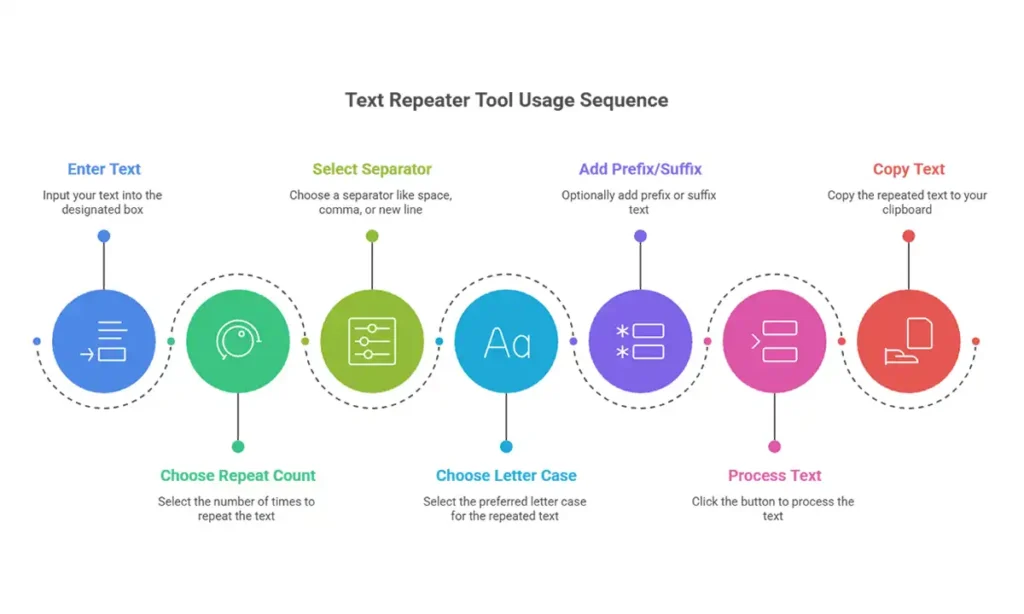
How to Use the Text Repeater Tool
Using the online text repeater on kiitool.com is very easy.
Step 1
Enter your text in the Input String box.
Step 2
Choose the Repeat Count.
Step 3
Select a separator like space, comma, or new line.
Step 4
Choose your preferred letter case.
Step 5
Add optional Prefix or Suffix text.
Step 6
Click the Process Text button.
Step 7
Copy the repeated text using the Copy button.
That’s it! Your repeated WhatsApp message is ready instantly.
Frequently Asked Questions (FAQ)
Yes, the tool on kiitool.com is completely free.
Yes, users can generate large repeated text easily.
Yes, the tool is mobile-friendly and works in browsers.
No, this is an online text repeater tool. No installation is needed.
Yes, it works well for WhatsApp, Facebook, Instagram, and other platforms.
Conclusion
If you need a quick and simple text repeater for WhatsApp, kiitool.com provides an easy way to repeat messages online. The tool’s capabilities include repetition count, separators, letter case, prefix, suffix, and one-click copy, which allow users to make repeated text quickly and effortlessly.
Try the free whatsapp text repeater on kiitool.com today and create repeated messages instantly without any hassle.
This online text repeater allows you to immediately replicate words and messages. Ideal for WhatsApp conversations, testing, and creative text formatting.
No more endless tabs or tool hunting.
KiiTool is a free all-in-one toolbox designed to simplify your daily tasks—fast, clean, and bookmark-free.
Contact
Info@kiitool.com
1463 Chandler Drive Springfield, MO 65806
© 2025 Developed by KiiTool