
# Popular Tools
# Blog Posts
No Posts Found!
Online Word Counter Tool
Words
0
Characters (incl. spaces)
0
Characters (excl. spaces)
0
Sentences
0
Paragraphs
0
Reading Time
~ 0 seconds
Speaking Time
~ 0 seconds
Word Frequency
No words to display frequency.
Web and Social Media Limits
| Name | Limit | Current | Status |
|---|
# Related Tools

Text to Slug


Add Line Number

Remove Line Breaks

Word Counter

Text Repeater

Remove Duplicate

Whitespace Remover

Sort Text
Free Online Word Counter Tool – Fast & Accurate
Today writing is everywhere – blogs, social media posts, emails, SEO content. This is why an online word counter tool is very important. In seconds, it helps learn a number of words and characters in text.
No matter where you write blog posts, Instagram posts, YouTube titles every platform has its restrictions. Your text should not be too short or long, otherwise, it will fail to perform. Such a simple tool that will save you some time and improve your writing quality.
What is a Word Counter Tool?
Word count tool is an online tool that helps you to count words and characters online. You simply paste or write your text and the tool displays:
1. Total words
2. Total characters
3. Sentences and paragraphs
It is a free counter of words that works in real-time. And you get to do this without pressing a single button. As you’re typing, it updates everything for you.
Features & Options
This count text online has quite a few great features. Let me explain them in layman terms:
🔹 Text Input Box
- You can type your text
- Or paste your content from anywhere
🔹 Buttons
These buttons help you edit your text :
- Uppercase → Convert all text into CAPITAL letters
- Lowercase → Convert all text into small letters
- Title Case → Make each word start with a capital letter
- Download Text → Save your text as a file
- Copy Text → Copy your text
- Clear → Remove all text with one click
🔹 Statistics Section
This section displays detailed information:
- Words → Total word count
- Characters (incl. spaces) → All characters including spaces
- Characters (excl. spaces) → Only letters and symbols
- Sentences → Total number of sentences
- Paragraphs → Total number of paragraphs
🔹 Reading Time
The tool has a reading time calculator. It gives you an estimated time for how long you need to read your text.
👉 Example:
- 200–250 words = 1 minute reading time
This option helps bloggers and content creators their writing.
🔹 Speaking Time
It also works as a speaking time calculator. It tells how long speaking your content will take.
👉 Example:
- 130–160 words = 1 minute speaking time
Perfect for speeches, presentations and videos.
🔹 Word Frequency
This feature works like a word frequency checker. It shows which words appear most in your text.
👉 Why it matters:
- Helps improve SEO
- Avoids repetition of the same words too much
🔹 Web & Social Media Limits Table (Very Important)
Different platforms have limits. This tool helps you stay within them:
- Meta Title → Max 60 characters
- Meta Description → Max 160 characters
- Google Ideal Post → Around 300 words
- Instagram Caption → 2200 characters
- Twitter (X) Post → 280 characters
- Twitter Username → 20 characters
- Facebook Post → 63,206 characters
- Facebook Comment → 8,000 characters
- Facebook Page Description → 255 characters
- Facebook Username → 50 characters
- YouTube Video Title → 70 characters
- YouTube Video Description → 5,000 characters
- Pinterest Pin Description → 500 characters
Could you please provide the text you’d like me to paraphrase? Once you share it, I’ll apply all the guidelines you’ve outlined, including:
1. Quality and format maintaining
2. Correcting usages of comma
3. Converting verb phrases to noun phrases if needed
4. Changing ‘for’ phrases to infinitive forms
5. Replacing AI-sounding words with natural alternatives
6. Preserving quoted material as written
Please paste the text you need rewritten, and I’ll get started right away.
Why these limits matter:
* Helps improve SEO ranking
* Keeps content clear and readable
* Avoids content cut-off on platforms
* Improves engagement
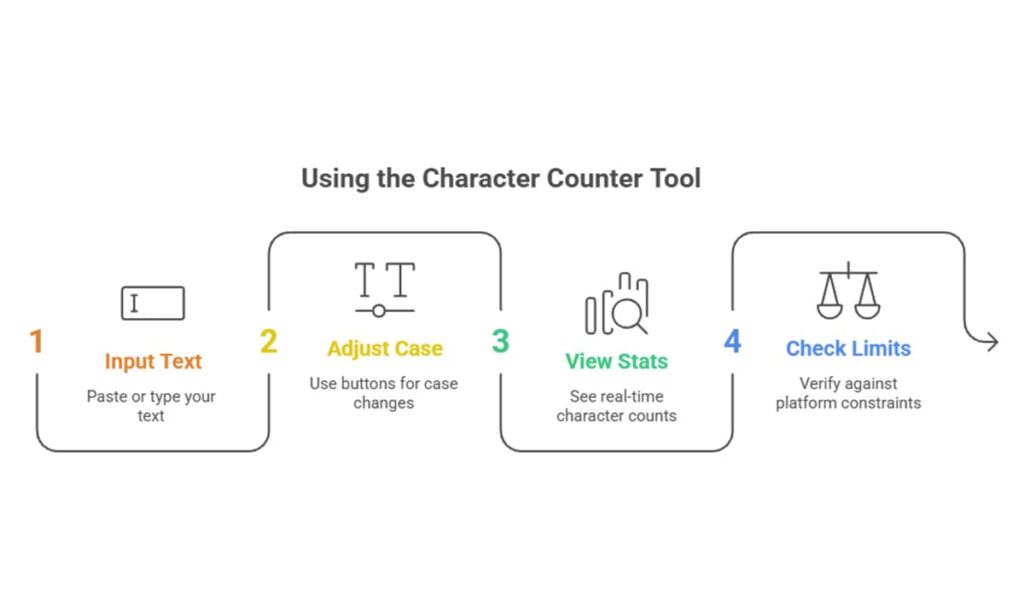
How to Use (Step-by-Step)
The process to use this character counter tool is very easy:
1. Paste or type your text
2. Use buttons (uppercase, lowercase, etc.) if needed
3. See real-time stats instantly
4. Check platform limits
5. Copy or download your final text
Benefits to Use This Tool
Here’s why this free word counter is useful:
- ✅ Better writing quality
- ✅ Instant results save time
- ✅ Great for SEO work
- ✅ Manage social media content length
- ✅ Simple and easy for beginners
Use Cases
This tool helps many people:
- Bloggers & Content Writers → Make articles better
- Students → Review assignments and essays
- SEO Experts → Better keyword usage
- Social Media Managers → Stay within limits
- Copywriters → Create better ads and captions
Frequently Asked Questions (FAQ)
A word counter online is a tool that counts words, characters and other text details.
Yes, this is a free word count tool.
The tool is very accurate and updates in real-time as you type.
Yes, this character counter tool helps you stay within social media limits.
Yes, it includes calculators for both reading time and speaking time.
Conclusion
A word counter online tool is essential for anyone who writes content. It helps you track words, characters reading time, and more—all in one place.
👉 Try this free Word Counter Tool now on kiitool.com and make your writing smarter and faster 🚀
No more endless tabs or tool hunting.
KiiTool is a free all-in-one toolbox designed to simplify your daily tasks—fast, clean, and bookmark-free.
Contact
Info@kiitool.com
1463 Chandler Drive Springfield, MO 65806
© 2025 Developed by KiiTool