
# Popular Tools
# Blog Posts
No Posts Found!
Line Break Removal Tool
Enhanced Features
Normalize Multiple Breaks: Converts multiple consecutive line breaks into a single one.
Remove Duplicate Lines: Filters out and keeps only unique lines.
Case Conversion: Convert text to UPPERCASE or lowercase.
Add Prefix/Suffix: Insert custom text at the start or end of each line.
Detailed Counters: Real-time character, word, and line counts.
Copy to Clipboard: Easily copy processed text with success feedback.
# Related Tools

Text to Slug


Add Line Number

Remove Line Breaks

Word Counter

Text Repeater

Remove Duplicate

Whitespace Remover

Sort Text
Remove Line Breaks Online – Free & Easy Text Line Break Remover Tool
If you want to remove line breaks online, you are in the right place. Some times, we copy text from PDFs, documents, or websites, it comes with unwanted line breaks. Then it’s hard to read and all the text look messy.
Line breaks can also break the text formating when you paste it into emails, code editors or any blogs. That’s why people want to remove line breaks from text with a simple way.
At kiitool.com, our Remove Line Breaks Tool helps you clean your text in seconds. No coding, no confusion just pastes your text and fix it with single click.
What is Remove Line Breaks Tool?
The Remove Line Breaks Tool is a free online tool that helps you delete line breaks online free and clean your text formatting.
It works like a smart text line break remover. You paste your text, choose options and get clean readable text.
This tool is perfect for beginners. You don’t need any technical skills. Just click and clean your text.
Features & Options Explained
This tool offers powerful options to help you clean text formatting online. Let’s understand each feature in simple words:
💠Replace breaks with space
This option removes line breaks and replaces them with spaces.
Example:
Hello
World
🔯 Output:
Hello World
💠 Normalize multiple breaks
If your text has too many blank lines, this option reduces them to a clean format.
Example:
Hello
World
🔯 Output:
Hello
World
💠 Remove empty lines
This option deletes all blank lines from your text.
Example:
Hello
World
🔯 Output:
Hello
World
💠 Remove duplicate lines
If the same line appears many times, this option keeps one.
Example:
Hello
Hello
World
🔯 Output:
Hello
World
💠 Trim lines
This removes extra spaces from the start and end of each line.
Example:
Hello
World
🔯 Output:
Hello
World
💠 Remove extra spaces
This option removes additional spaces between words.
Example:
Hello World
🔯 Output:
Hello World
💠 Convert to UPPERCASE
This changes all text into capital letters.
Example:
hello world
🔯 Output:
HELLO WORLD
💠 Convert to lowercase
This changes all text into small letters.
Example:
HELLO WORLD
🔯 Output:
hello world
💠 Add Prefix to Each Line
This adds a word or symbol at the start of every line.
Example (Prefix: “>”):
Hello World
🔯 Output:
> Hello World
💠 Add Suffix to Each Line
This adds text at the end of every line.
Example (Suffix: “,”):
Hello
World
🔯 Output:
Hello,
World,
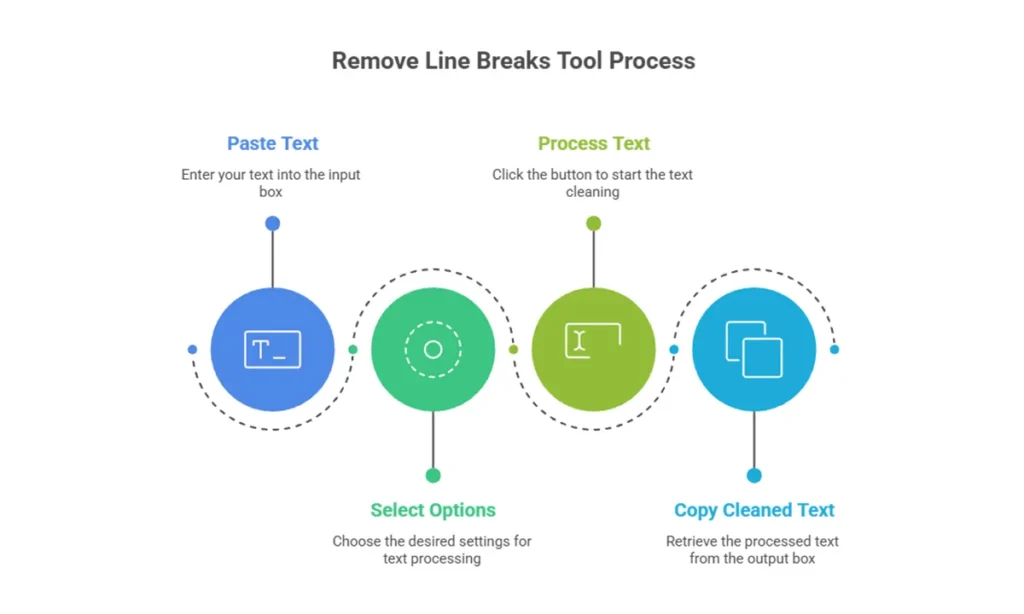
How to Use This Tool?
Using this remove line breaks tool is easy. Just follow these steps:
- Paste your text in the input box
- Select the options you need
- Click the “Process Text” button
- Copy your cleaned text from the output box
That’s it! Your text is ready in seconds
Benefits of Using This Tool
Here’s why this tool is helpful:
- Saves time and effort
- Cleans messy text
- Easy to use for everyone
- No download needed
- Works on all devices
- 100% free
You can remove line breaks online without any stress.
Use Cases
This text line break remover helps in many real-life situations:
- Writers & Bloggers: Clean copied articles
- Students: Fix notes from PDFs
- Developers: Format code or data
- Data Entry: Clean bulk text
- SEO Experts: Prepare content to publish
No matter your work, this tool helps you keep your text neat and readable.
Frequently Asked Questions (FAQ)
It means getting rid of extra line breaks in your text with an online tool. This keeps your text smooth, easy to read, and saves you from fixing it by hand.
Yes, it’s free on kiitool.com. You can use it to delete line breaks online free with no need for signing up or downloading.
Yes, the tool lets you paste a lot of text. It works fast to take out the line breaks and processes your text in no time.
Your data stays secure. The tool runs in your browser. It won't save or share anything you type.
! It's more than just a line break remover. You can also:
- Get rid of extra spaces
- Erase repeated lines
- Change text to all caps or all lowercase
- Add words at the start or end of lines
This tool is a full setup to tidy up your text online.
In the End
This tool is the best way to quickly and easily get rid of line breaks online. It helps you get rid of line breaks in text, fix formatting problems, and make your writing look neat and professional.
👉 Use this free tool on kiitool.com right now to make your writing perfect in seconds!
No more endless tabs or tool hunting.
KiiTool is a free all-in-one toolbox designed to simplify your daily tasks—fast, clean, and bookmark-free.
Contact
Info@kiitool.com
1463 Chandler Drive Springfield, MO 65806
© 2025 Developed by KiiTool